I find my self taking a lot of notes at the moment, whether that be while I’m listening to an audiobook or podcast, watching a Skillshare video or reading a book. My preference is to do this digitally, usually on my iPad, although I do sometime take notes by hand or even rarely on my mac.
As such, I need a tool that allows me to sync theses notes across all of my devices, but that I can organise in a way so that I can access them quickly and efficiently. What’s the point in having the information if you haven’t got it to hand or can’t find it?!
After a few trials and tribulations, I have found myself using Notability extensively over the last couple of years. I remember watching at least one of Ali Abdaal’s Notability videos on YouTube (potentially how I got hooked on his channel!). The only exception to this is that I generally use Microsoft OneNote for work notes as we’re heavily integrated into the Microsoft Office 365 ecosystem. It also means that I can segregate them for ease of access.
So, we’re going to touch on what I use Notability for and how I use it. As usual, this is purely based on my note taking experience, although it is worth pointing out that the bulk of my note taking is done on my iPad (6th Gen) with an Apple Pencil (1st Gen).
So, what do I use Notability for then? In short, it houses the all of my personal, YouTube or website notes. I do have a few work notes on this too, but purely because I find the drawing functionality much better on here than on OneNote.
In Notability, you can set up Dividers and Subjects as a system to store your notes. So, a Subject groups Notes, and Dividers Group Subjects. For the visual amongst us, I’ve put together a little mind map (courtesy of Mindomo, but that will be another topic in due course) to demonstrate the storage heriarchy.
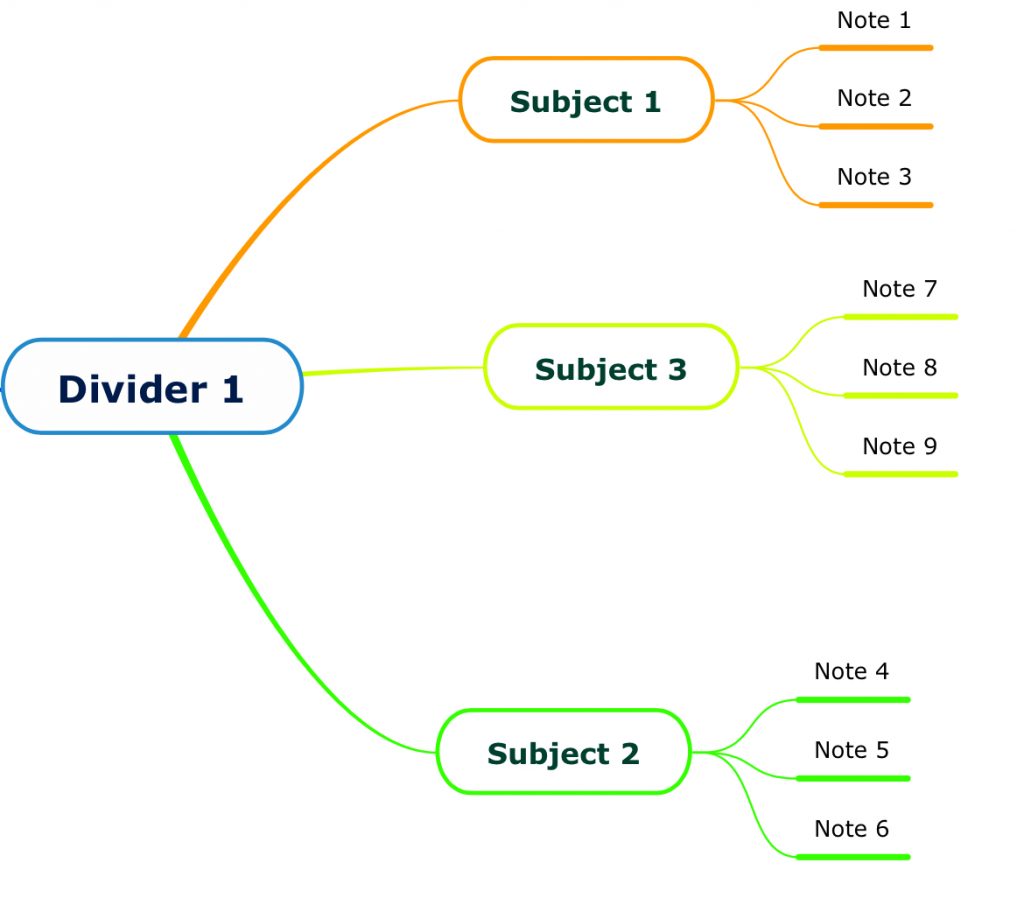
An example of a Divider for me would be learning, then inside of that I have the Subjects of books, Skillshare, YouTube and podcasts. Each one is then populated with as many notes as I want. I would use a Note for each podcast, book etc so I can easily find the specific resource that I’m looking for.
For me, the three main reasons I use Notability are:
- Cross device access; I can review edit and share my notes on my Mac, iPad or iPhone, and any edits I make are seamlessly updated across all of my devices.
- Storage system; I can create numerous Dividers and Subjects meaning that I can locate and review specific notes quickly. I can then colour code and order them however I want, putting my most accessed Dividers or Subjects near the top of the pile.
- Usability; I love how easy it is to make notes on Notability, the hand writing is smooth and readable (as much as my handwriting is!) and I can edit my notes on the go.
The great thing about keeping digital notes (and even digitising manual notes!) is that you can easily drop links or images into the body of the notes that you’re taking. I can slo change the paper type (lined, squares etc) or the paper colour. With my Apple Pencil, I have complete control over the pen that I’m using (colour, width etc) or can change it to a highlighter. It’s also easy to input typed text, and move anything around as your notes develop.
In short, each individual note is fully customisable and adaptable exactly how you see fit. If you make an error, no problem, undo or erase or just simply alter it to move it around. And the fact that it is digital makes it so easy. I’ve put together a short video on how this looks on my iPad below.
This is also one of the very few times I use the camera on the iPad. For instance, if I get a handout or similar, I can then quickly take a pic and import it straight into the note and make my notes all in one file.
Notability really comes into it’s own on the iPad when you utilise it with other apps. For instance, If I open notability, I can then use Skillshare or YouTube as a floating app that I can pull in from the side of the screen. This means I have the resource and my note all on one screen.
I’m sure that I don’t use Notability to the full extent (for instance the sound recording is apparently amazing), but this system that I have developed to take, store and review my notes works perfectly for me. As you know, I’m a huge advocate of continued learning and note taking is a really important part of the process for me. It means I can then refer back to my notes to double check anything or even add new comments if I see fit.
I’ve used Notability for a number of years now, so I think some of the functionalities may be a part of the premium version, but I would definitely check them out to see if it is worth your while. If you’re serious about taking and organising your notes, I would definitely recommend using these apps, but obviously do some research around the other tools available and start building a system that works for you!